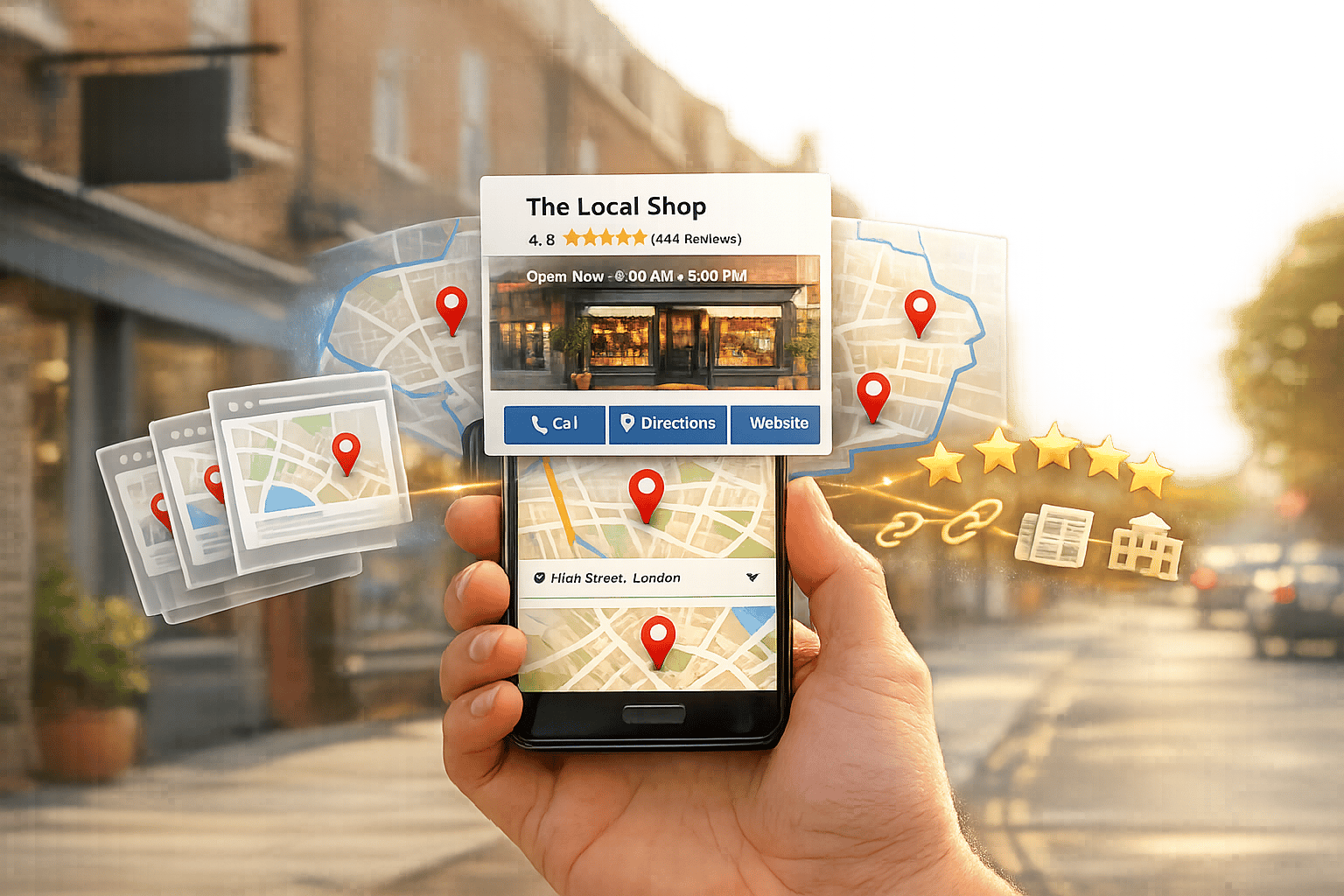
How to Local seo for business: A Step-by-Step Guide (With Examples)
Local SEO helps your business appear in search results when potential customers in your area are ready to act. For example, 46% of Google searches have local intent, and 76% of "near me" searches lead to visits within 24 hours. This guide explains how to improve your local search presence, covering:
- Define your service area: Be specific about where you operate (e.g., focus on boroughs like Hackney instead of all of London).
- Optimise your Google Business Profile (GBP): Complete every section, add photos, and keep details updated.
- Check your visibility: Use tools like BrightLocal to ensure your Name, Address, and Phone number (NAP) are consistent across platforms.
- Target local keywords: Prioritise specific terms like "boiler repair Sheffield" over broad, competitive ones.
- Build local content: Create individual pages for each service area, including unique, location-specific details.
- Encourage reviews: Aim for a 4.0+ rating and respond to feedback promptly.
- Earn local backlinks: Join local directories, sponsor events, and partner with trusted organisations.
Tracking results is key - monitor impressions, clicks, and customer actions using tools like Google Search Console and GBP Insights. Stick to these steps consistently to attract more local customers and grow your business.
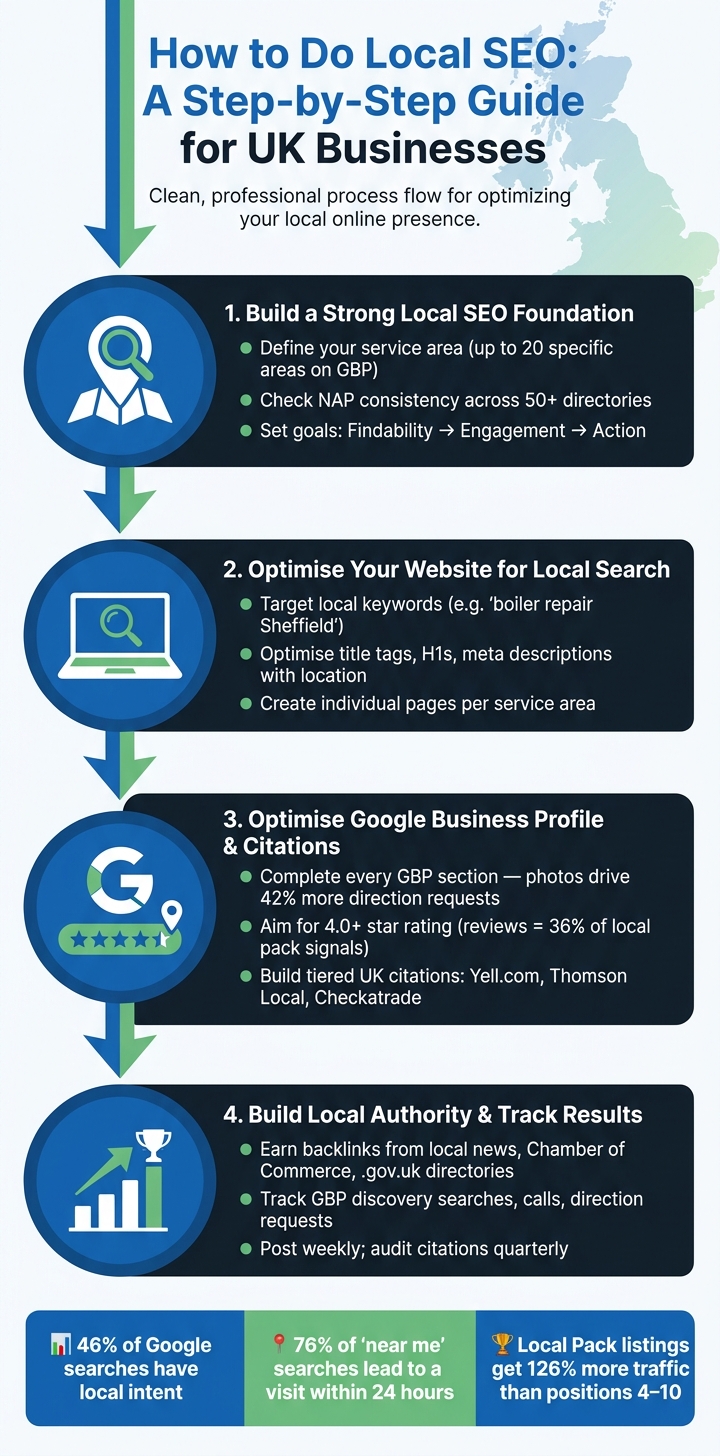
Local SEO Step-by-Step Guide for UK Businesses
Local SEO Google Business Profile Best Practices 2026
sbb-itb-6d98f47
Step 1: Build a Strong Local SEO Foundation
Before diving into local SEO optimisation, it’s crucial to establish a solid foundation. Without it, your efforts may stall or fail to deliver the desired results.
Define Your Service Area and Target Audience
Start by clearly defining your service area. Be precise about where you operate. For instance, if you’re a plumber working in South Manchester, specify that area instead of claiming the whole of Greater Manchester or the North West. Luke Hopkins emphasises this point:
"Define your service area accurately. Don't claim the entire UK if you only cover West Sussex. Google values accuracy, and spreading too wide can dilute your relevance."
Google Business Profile allows you to list up to 20 specific service areas. Use towns, cities, or postcodes for better accuracy instead of broad regions. For example, in London, you can focus on boroughs like Hackney or Southwark, while in other parts of the UK, city or county-level targeting is usually sufficient.
Once your geographical area is defined, consider the intent behind local searches. Most local queries fall into three main categories: Hire (e.g., "emergency electrician Bristol"), Learn (e.g., "cost of rewiring a house UK"), and Navigate (e.g., "Spark & Sons contact number"). Aligning your services with these intent types ensures that your content meets the needs of potential customers at the right moment. This clarity also guides your visibility audit and goal-setting process.
Check Your Current Local Visibility
After defining your service area, it’s time to evaluate your current local presence. Start by searching for your business name, phone number, and address on Google Maps. Look out for duplicate listings, as these can split your ranking signals and negatively impact your visibility.
Next, review your NAP consistency (Name, Address, Phone number). Ensure your details are identical across all platforms, including your website, Yell.com, Thomson Local, Facebook, and others. Even minor inconsistencies, like "St." versus "Street", can confuse Google. Matthew Edwards, Founder of Mars Digital, highlights:
"The most important things our agency looks for when performing an audit is missing and inaccurate information."
Tools such as BrightLocal can streamline this process by checking your NAP across 50+ directories simultaneously. Additionally, tools like PlePer and GMB Everywhere help you identify the categories your top competitors are using. This detail alone accounts for about 32% of service relevance ranking weight.
Set Clear Local SEO Goals
With your service area defined and visibility reviewed, it’s time to set specific goals for your local SEO strategy. Focus on how local SEO impacts your revenue by tracking calls, enquiries, and bookings.
A simple approach is to monitor three key areas: Findability (are people finding you in search?), Engagement (are they clicking through?), and Action (are they contacting you or submitting forms?). Use the following metrics to guide your tracking:
| Goal Area | What to Track | Where to Find It |
|---|---|---|
| Findability | Impressions for "service + town" queries | Google Search Console |
| Engagement | Click-through rate (CTR), bounce rate | Search Console / GA4 |
| Action | Calls, direction requests, form submissions | GBP Insights / CRM |
| Trust | Review volume, average rating, response rate | Google Business Profile |
| Conversion Value | Enquiry-to-sale rate, £ revenue attributed | CRM / Analytics |
To track traffic and revenue, attach UTM parameters to your Google Business Profile link (e.g., ?utm_source=google&utm_medium=organic&utm_campaign=gbp). Keep a simple change log to document updates, dates, and the KPIs you’re monitoring. This helps you understand how your efforts influence results.
Step 2: Optimise Your Website for Local Search
Once you've defined your service area and set clear goals, the next step is making sure your website highlights its local relevance to both Google and your potential customers.
Research Local Keywords
Focus on keywords that are specific to your area and have clear intent, rather than chasing broad terms with high search volumes. For example, a phrase like "boiler repair Sheffield" with just 50 monthly searches can be far more effective than a national keyword with thousands of searches that you're unlikely to rank for. As Respect Experts point out:
"A keyword with 50 monthly searches in your town can be more valuable than a national keyword with 5,000 searches you'll never rank for."
Start by reviewing Google Search Console to identify keywords ranking in positions 11–30. Refining these can help push them onto the first page. Use tools like Google Autocomplete to explore real-world queries by typing in your service and location. The "People Also Ask" section is another great resource for finding long-tail, question-based keywords that you can use to enrich your service page content.
When building your keyword list, combine your services with the specific areas you cover. Think beyond the main city and include nearby towns, districts, and postcodes. You can also use modifiers like:
- Main City/Town: "Accountant Manchester", "Solicitor Leeds"
- Neighbourhood/District: "Plumber Didsbury", "Cafe Brixton"
- Postcodes: "Emergency Dentist M1", "Cleaner SW1"
- Urgent Modifiers: "Same day boiler repair", "24-hour locksmith"
Avoid overloading your content with "near me" phrases, as Google already factors in device location data. Once you’ve identified your target keywords, integrate them naturally into your site’s content for maximum impact.
Optimise On-Page Elements
Your on-page elements - like title tags, H1 headings, meta descriptions, image alt text, and body copy - should clearly communicate both your service and location. For instance, a title tag such as "Emergency Plumber in Bristol | Available 24 Hours" immediately makes your page's purpose clear.
Additionally, implement LocalBusiness schema in JSON-LD format to help search engines understand your business. Using a specific schema subtype, such as "Plumber" or "Dentist", rather than the generic "LocalBusiness", enhances your local signals. Ensure your site performs well on mobile, with fast load times (Largest Contentful Paint under 2.5 seconds and Cumulative Layout Shift below 0.1).
Apply these on-page strategies consistently across all your pages to maximise their effectiveness.
Create Pages for Each Service Area
If your business serves multiple locations, relying on just your homepage won’t cut it. Instead, create individual pages for each area you serve (e.g., /plumber-chichester/, /locations/manchester/). Each page should feature original, relevant content rather than simply swapping out the town name on a template.
Luke Hopkins from Notus Digital explains:
"Location pages work brilliantly for service businesses, but only if each page offers genuinely unique, useful content. Swapping out the town name on a template won't cut it."
To make each page stand out, include local testimonials, references to well-known landmarks, photos of your work in that area, or a list of sub-services you provide locally. In areas with high competition, like London, you might even create borough-specific pages (e.g., /locations/camden/) to align with highly specific local search intent. Ensure each location page links back to your main service page and other nearby location pages to help Google understand the connections between your services and regions.
Step 3: Optimise Your Google Business Profile and Citations
Claim and Optimise Your Google Business Profile
Your Google Business Profile (GBP) is a cornerstone of local SEO. Liam Hayward, SEO Specialist, highlights its importance:
"Google Business Profile is the single most important ranking factor for the local pack and Maps results."
Start by claiming or creating your profile at business.google.com. In the UK, verification is typically done via postcard and can take one to two weeks, though some businesses may qualify for phone or video verification. Once verified, choose the most precise primary category for your business. For instance, "Indian Restaurant" is far more effective than the broader "Restaurant."
Fill in every section of your profile. Use the 750-character description to clearly outline your services, location, and what makes you stand out - steering clear of keyword stuffing. Add high-quality photos to your profile; businesses with photos see 42% more direction requests and 35% more clicks. Keep your GBP fresh by updating it weekly - this can lead to 520% more customer actions.
For mobile businesses, ensure you hide your home address and clearly define your service area by specifying towns or postcodes. Keep your holiday hours accurate and up to date, using UK date formats (e.g., 25 December) to avoid frustrating customers.
Once your profile is fully optimised, the next step is to focus on customer engagement, particularly through reviews.
Get and Manage Customer Reviews
Reviews play a massive role in local SEO, influencing about 36% of local pack ranking signals. Aiming for at least a 4.0-star rating is crucial for maintaining visibility in local search results.
Ask for reviews right after completing a job, as customer satisfaction is typically highest at this point. Use the direct review link from your GBP dashboard (formatted as g.page/r/[ID]/review) to make the process simple. If you're in trades, consider including a QR code on invoices or job completion cards to encourage customers to leave feedback. Ask reviewers to mention both the service they received and your location to increase the review’s local relevance.
Respond to all reviews within 24–48 hours. For negative feedback, acknowledge the issue, apologise briefly, and suggest resolving the matter offline. Aim to collect 3–5 new reviews each month to maintain trust and relevance.
Build UK-Specific Citations
Once your reviews are in good shape, strengthen your local presence by building consistent UK-specific citations. Citations are online mentions of your business name, address, and phone number (NAP). Consistency is critical - something as small as "Street" versus "St" can confuse search engines. Alarmingly, 90% of UK businesses have inconsistent NAP data.
To avoid this, create a single reference document with your exact business name, correctly formatted address (e.g., SW1A 1AA), and phone number. Use this document as your master source when submitting to directories.
Focus on citations in a tiered approach:
| Citation Tier | Platform Examples | Purpose |
|---|---|---|
| Tier 1: Foundational | Google Business Profile, Bing Places, Apple Business Connect, Yell.com | Key platforms for rankings and data aggregation |
| Tier 2: Major UK | Thomson Local, 192.com, Scoot, FreeIndex, Facebook | Boosts general visibility with strong backlinks |
| Tier 3: Industry-Specific | Checkatrade (Trades), Law Society (Legal), TripAdvisor (Hospitality) | Builds authority within your niche |
Accuracy and quality outweigh sheer volume. Around 15 to 25 well-maintained, high-authority citations are often more effective than hundreds of inconsistent ones. Don’t overlook local council directories; their .gov.uk domain adds a layer of trust. Finally, schedule quarterly audits to update outdated information, such as old phone numbers or addresses, to keep your rankings secure.
Step 4: Build Local Authority and Track Results
Earn Local Backlinks and Community Mentions
Once you've optimised your citations and reviews, it's time to focus on building your local authority. Securing links from trusted local sources can significantly boost your credibility. For instance, being featured in respected outlets like the Manchester Evening News or Yorkshire Post not only enhances your visibility but also signals to search engines that your business is deeply rooted in the community.
"75% of local SEO experts now value links from community sites, and 70% value links from local news sources." - BrightLocal
Joining your local Chamber of Commerce, which typically costs between £150 and £600 annually, can provide a valuable .org.uk backlink. Similarly, sponsoring local events or organisations - like sports teams or school fairs - can earn you links from .sch.uk or .org.uk domains. Adding your business to your council's directory can even secure a trusted .gov.uk link. These high-quality links matter because link signals contribute around 15% to local organic rankings. In fact, a single link from a reputable source, such as the Federation of Small Businesses or a local university, can outweigh dozens of low-quality directory entries.
To ensure your efforts are paying off, track the impact of these links and mentions through key performance indicators.
Track Your Local SEO Performance
Building authority is just one piece of the puzzle - you need to measure its effectiveness. Local SEO thrives on consistent monitoring, helping you identify what's working and where to fine-tune your strategy. Dive into your Google Business Profile insights, paying special attention to discovery searches. These occur when users find you through categories rather than searching your name, indicating your SEO is reaching a broader audience. Also, keep an eye on direction requests, click-to-call actions, and website visits, as these real-world interactions increasingly influence rankings.
For a more detailed view, consider using geo-grid rank tracking tools. These tools can help you visualise how your rankings vary across your service area. Many single-location businesses in the UK find that a 7×7 grid with 1-mile spacing provides the clearest picture.
"Local search rankings aren't a single number. They're a geographic distribution - different results for different searcher locations." - Kevin Reed, Flento
Keep Your Local SEO Up to Date
Once you've established authority and are tracking results, maintaining your momentum is key. Regular updates to your local SEO strategy ensure that your hard work continues to pay off. Post to your Google Business Profile at least once a week - any gap longer than 30 days can lead to a noticeable drop in impressions. Add two to three geo-tagged photos each month and respond to reviews within 24–48 hours to keep your profile active and appealing. Quarterly citation audits are also essential to fix any NAP (Name, Address, Phone number) inconsistencies, and you should regularly verify your LocalBusiness schema using Google's Rich Results Test.
Here’s a quick breakdown of tasks to keep your strategy on track:
| Frequency | Task | Metrics |
|---|---|---|
| Weekly | Google Business Profile posts & review responses | Calls, website clicks |
| Monthly | Add geo-tagged photos & review insights | Profile views, search queries |
| Quarterly | Citation audit: Fix NAP/schema issues | Listing consistency, authority |
| Bi-Annually | Refresh content & review strategy | Organic conversions, ROI |
With 40% of local queries now triggering Google AI Overviews, it's also crucial to optimise your website for these AI-generated answers. Include specific, detailed information about your services. For example, instead of vague descriptions, say something like, "completed over 3,000 boiler installations across West Yorkshire." A clear and well-structured website, paired with consistent citations, significantly increases your chances of being recognised by AI systems.
"The businesses that dominate local search results in their area aren't doing anything secret; they're doing the fundamentals consistently and well." - John Carey, SEO Consultant
Conclusion: Key Steps to Local SEO Success
Local SEO is all about persistence. It rewards businesses that commit to showing up consistently over time. The steps outlined in this guide work together like pieces of a puzzle: building a strong foundation, maintaining a well-optimised website, completing your Google Business Profile, securing accurate citations, and encouraging genuine, consistent reviews. Together, these efforts can elevate your business in local search rankings.
The results speak for themselves. Businesses featured in Google's Local Pack enjoy 126% more traffic than those ranked between positions four and ten. Profiles with high-quality photos see 42% more direction requests and 35% more website click-throughs. With 46% of all Google searches having local intent, the potential for UK businesses is undeniable - but only for those willing to continuously refine their online presence. These numbers highlight how sustained effort pays off.
"Local customers are not 'finding you on Google' anymore, they are choosing you on Google." - Ali Azlan, SEO Specialist
The key mindset shift here is to view your Google Business Profile, citations, and content as living assets. They're not tasks you tick off once and forget - they require ongoing care and attention. Anthony Barone, SEO Specialist at StudioHawk, explains it perfectly: "Treating your Google Business Profile as a living, managed asset rather than a one-time task is the mindset shift that separates businesses that dominate local search from those that barely appear."
Now it’s time to act. Stick to the basics, apply them consistently, and monitor the results - whether that's more calls, visits, or enquiries. This is what effective local SEO looks like in practice, forming a complete strategy for UK businesses ready to thrive in local search.
FAQs
How long does local SEO take to work in the UK?
Local SEO in the UK can deliver noticeable early results, such as a boost in impressions, within 2–4 weeks, particularly when focusing on optimising your Google Business Profile. However, measurable improvements in rankings generally take around 3–4 months to surface, with more substantial growth and competitive rankings often requiring 6–12 months of consistent effort.
The timeline for results can vary based on the level of competition in your industry. For example, trades like plumbing or landscaping may achieve quicker progress compared to sectors like finance or law, which are typically more competitive. To maintain momentum, it's essential to focus on ongoing efforts such as generating customer reviews and ensuring your NAP (Name, Address, Phone number) details remain accurate and consistent across platforms. These actions help build trust and improve your local search visibility over time.
Should I create location pages if I don’t have a shop in that area?
If your business serves multiple areas but doesn't have a physical shop in each location, you can still create location pages. These pages can help your business rank for location-based searches, though they won't show up in Google's local pack unless you have a verified address.
To make these pages effective, focus on providing unique and useful content for each location. Avoid the temptation to just swap out town names on identical pages. Instead, include details that resonate with the area, such as local landmarks, information about services tailored to that location, and even testimonials from customers in the area. This makes the pages more relevant and valuable to users.
What should I do if I have duplicate Google Business Profiles?
To handle duplicate Google Business Profiles, begin by confirming whether you own or manage the duplicate listing. If the duplicate was created accidentally, simply remove it from your account. For unverified duplicates, head to Google Maps, click on Suggest an edit, choose Close or remove, and label it as a duplicate. If both profiles belong to you, you can request a merge via the Google Business Help Centre. Make sure the details on both listings match exactly before submitting your request.