The Local seo for business Checklist: 10 Actions to Take This Month
If your business targets local customers in the UK, local SEO is essential. Why? Because 46% of all Google searches are location-based, and 76% of people who search locally on mobile visit a business within a day. This guide lays out 10 actionable steps to help your business rank higher in local searches, drive more traffic, and attract ready-to-buy customers. Here's a quick summary:
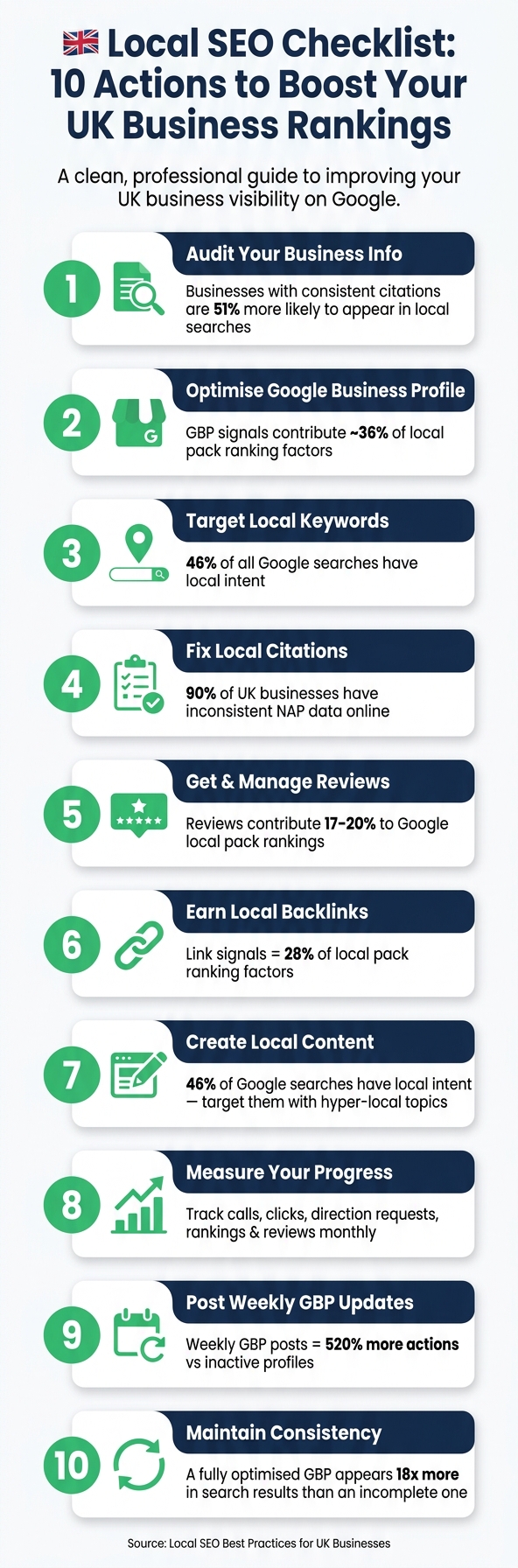
- Audit Your Business Info: Ensure your NAP (Name, Address, Phone) details are consistent across all platforms.
- Optimise Google Business Profile (GBP): Claim, verify, and update your GBP with accurate details, photos, and weekly posts.
- Target Local Keywords: Use location-specific terms like "Electrician in Manchester" in your website's content and meta tags.
- Fix Citations: Correct any outdated or inconsistent business listings on directories.
- Get Reviews: Actively request and respond to customer feedback to build trust and improve rankings.
- Earn Local Backlinks: Partner with local organisations, sponsors, or directories for links that boost authority.
- Create Local Content: Write blogs or case studies tailored to your area and audience.
- Track Progress: Use tools like Google Business Profile Insights and Search Console to monitor results.
Focus on consistency and quality across your online presence. Whether it's your Google profile, website, or citations, small, regular updates can lead to measurable improvements in visibility and customer engagement.
Local SEO Checklist: 10 Actions to Boost Your UK Business Rankings
10 Step Local SEO Audit Checklist to Boost Small Business Rankings
Action 1: Audit and Standardise Your Business Information
Start by ensuring your business details are accurate and consistent across all online platforms. This is the foundation of effective local SEO. Businesses with consistent citations are 51% more likely to appear in local searches, giving you a clear edge without any extra cost. Make sure your NAP (Name, Address, and Phone number) details are correct and follow UK conventions.
Check NAP Consistency
Your Name, Address, and Phone number (NAP) should be identical everywhere your business appears online - whether it’s your website, Google Business Profile, Yell, ThomsonLocal, or other directories. Even the smallest inconsistency can confuse Google and weaken your local search signals.
"The most important things our agency looks for when performing an audit is missing and inaccurate information." - Matthew Edwards, Founder, Mars Digital
Details as minor as using "&" instead of "and" or "Ltd" instead of "Limited" can disrupt verification. To identify discrepancies, search for your business name on Google Maps, then separately search for your phone number and address to spot duplicate or outdated listings. Tools like BrightLocal or Moz Local can make this process easier by scanning multiple directories for inconsistencies.
Use UK Formatting
Standardising your business information ensures Google recognises your listings as belonging to a legitimate UK business.
| Element | UK Formatting Rule | Example |
|---|---|---|
| Postcode | Full alphanumeric with space | SW1A 1AA |
| Phone (Schema) | International +44 format | +44-20-1234-5678 |
| Phone (Display) | Local UK spacing | 020 7123 4567 |
| Opening Hours | 24-hour clock | 09:00–17:30 |
| Country Code | ISO 3166-1 alpha-2 | GB |
For your website's structured data (LocalBusiness schema), use the +44 format. However, on the contact page or footer, display the phone number in the familiar local format for UK visitors. Also, be consistent with abbreviations - choose either "Street" or "St" and stick with it across all platforms.
Record Your Core Details
To avoid discrepancies over time, maintain a master NAP spreadsheet. This document should include your official business name, complete address, phone number, website URL, and login details for each directory. This prevents "data drift", where updates to one platform don’t match others. Review this spreadsheet annually, or quarterly if your business details change frequently. This simple practice keeps your information consistent and reliable everywhere it appears.
Action 2: Optimise Your Google Business Profile (GBP)
Once your business details are standardised, the next step is to strengthen your online visibility through your Google Business Profile.
Your Google Business Profile (GBP) is a free tool and a key player in local SEO for UK businesses. In fact, GBP signals contribute to about 36% of local pack ranking factors. This means that a well-maintained profile can significantly increase your chances of appearing in Google Maps and local search results, where your customers are most likely to look.
Claim and Verify Your Listing
Start by visiting business.google.com, logging in, and searching for your business name. If a listing already exists, click "Claim this business." If not, choose "Add your business to Google". If someone else has already claimed the profile - such as a former employee or agency - you can use the "Request Access" feature to regain control.
Since 2026, video verification has become the standard for most UK businesses. This process requires you to record a continuous video (at least 30 seconds long) that shows your business exterior with visible street signs, your official signage matching the profile name, and proof of management, such as unlocking the door or entering a staff-only area. The video must be recorded live within Google's interface - pre-recorded uploads are not allowed.
"Your primary category is the number one local ranking factor for appearing in Google's local pack." - Whitespark's Local Search Ranking Factors survey
After completing the verification, choose the most specific primary category for your business, like "Emergency Plumber" or "Family Law Solicitor", to improve your local rankings.
Add Full Business Details
Once your profile is verified, it's time to fill it out with detailed and accurate information to improve your visibility in search results.
Use the full 750-character limit for your business description to highlight your services, location, and what sets you apart. Include local keywords, such as the towns or boroughs you serve, but avoid promotional language or links, as Google will reject descriptions that sound like adverts.
Add secondary categories (up to nine) to reflect related services, and list each service individually with a concise description (100–300 characters) and pricing in £ where applicable. These details help Google match your profile to more local searches. Enable UK-specific attributes like "Emergency callouts available" or "Free estimates", and pre-fill the Q&A section with answers to common customer questions.
Photos are another critical element. Profiles with photos see 42% more requests for driving directions and 35% more website clicks compared to those without. Upload 2–4 high-quality, real images each month. Exterior shots with clear signage are particularly helpful for making your business easy to find.
Post Weekly Updates
Google Posts expire after seven days, so posting weekly ensures your profile remains active. Aim for one or two posts per week, and place the most important information within the first 80 characters, as Google often truncates previews in search results.
Use clear call-to-action buttons like "Book Online", "Call Now", or "Get Offer" to encourage direct customer engagement. Rotate your content between the available post types: "What's New" for general updates, "Offers" for limited-time promotions (which display with a yellow tag), and "Events" for things like workshops or open days. Posts with images generate 10x more engagement than text-only updates, so always include a real photo instead of a stock image.
Action 3: Optimise Your Website for Local Keywords
After fine-tuning your Google Business Profile (GBP), it’s time to ensure your website is doing its part in local search. With 46% of all Google searches having local intent, your site needs to connect directly with the people in your area.
Research Local Keywords
Start with the service + location formula: combine what you offer with where you offer it. For example, "Electrician in Birmingham" or "Family Solicitor Manchester." To dig even deeper, include hyper-local details like neighbourhood names, postcodes, or nearby landmarks. These specifics can help you capture the more detailed searches that tools like voice assistants and AI-driven platforms often prioritise.
Use tools like Google autocomplete and "People Also Ask" to gather real-time search terms. Then, refine your research with Google Keyword Planner, but make sure to set the location filter to your town or city, not the entire UK. Broad data can skew your understanding of local search trends.
Avoid stuffing "near me" into your content. SEO consultant Sean Horton explains:
"'Near me' is a proximity signal, not a keyword you need to add to your website content." - Sean Horton, Respect Experts
Google determines proximity based on the user's GPS or IP address, not by matching the phrase on your page. Instead, focus on actual place names to signal your location relevance.
Update On-Page Elements
Once you've identified your target keywords, weave them into your site's core elements. For example, format your title tag like this: Service + Location + Business Name (e.g., "Plumber in Birmingham | Joe's Plumbing"). Reinforce this in your H1 with a natural phrase like "Expert Boiler Repair in Solihull", and use clean, descriptive URLs such as /locations/leeds-locksmith.
| On-Page Element | What to Do | Example |
|---|---|---|
| Title Tag | Service + Location + Brand | Plumber in Birmingham | Joe's Plumbing |
| H1 Header | Primary service + town | Expert Boiler Repair in Solihull |
| URL Slug | /locations/town-service | /locations/leeds-locksmith |
| Footer | Canonical NAP on every page | 12 High Street, Leeds, LS1 4AB | 0113 496 0000 |
| Schema | LocalBusiness JSON-LD | Includes GeoCoordinates and OpeningHours |
Display your NAP (Name, Address, Phone number) consistently in your footer and schema markup, ensuring it matches your GBP exactly. Any inconsistency can hurt your local search visibility by up to 28%. Adding LocalBusiness schema in JSON-LD format helps search engines understand your business details like opening hours, location, and services. This is increasingly vital as 40% of local business queries now trigger Google's AI Overviews.
Improve Mobile Performance
Since 84% of local searches happen on mobile devices, your site needs to perform flawlessly on mobile. A slow or frustrating experience can drive potential customers away.
Run your site through Google PageSpeed Insights and aim for a load time of under 3 seconds on a 4G connection. Focus on Core Web Vitals: keep LCP under 2.5 seconds, CLS under 0.1, and INP under 200 milliseconds. Make phone numbers clickable with tel: links, and add a "Get Directions" button that opens in Google Maps. These small but essential tweaks can make a big difference in converting mobile users into actual customers.
Action 4: Build and Fix Local Citations
Building and fixing citations is a crucial step in boosting your Local SEO efforts, especially for businesses in the UK. A citation refers to any online mention of your business name, address, and phone number (NAP). Search engines rely on these mentions to confirm your business's legitimacy and location. However, 90% of UK businesses have inconsistent NAP data online. These inconsistencies can harm your local search rankings.
As David Galvin, Technical SEO Specialist at Gorilla Marketing UK, explains:
"Your Google Business Profile is the anchor... but Google doesn't just trust what you tell it directly. It cross-references your information against other sources across the web."
Audit Your Current Citations
Before creating new listings, it’s essential to review what’s already out there. Start by searching your business name and postcode in quotation marks on Google. Repeat this process with your phone number and any old addresses if you’ve moved recently. Look for duplicates or outdated details, such as inconsistent abbreviations or incorrect phone number formats.
Jonathan Bird of Delivered Social puts it this way:
"Inconsistent NAP data creates doubt. That doubt suppresses your local search rankings. It's not a dramatic penalty - it's a slow, invisible drag on your visibility that compounds over time."
To speed up the process, tools like BrightLocal or Whitespark can help identify inconsistencies, though they come with subscription fees. Once you’ve pinpointed errors, claim each listing using the "Own this business?" feature and update it to match your master NAP record. Pay attention to details like spaces in postcodes (SW1A 1AA, not SW1A1AA). After cleaning up your existing citations, you can focus on creating listings on important local platforms.
Add Listings to Key UK Platforms
With your existing citations in order, the next step is to secure listings on major UK platforms. Focus on those that feed data directly into tools like ChatGPT and other AI systems.
| Tier | Platform | Why It Matters | Cost |
|---|---|---|---|
| 1 – Essential | Google Business Profile | Primary ranking factor for Maps and Search | Free |
| 1 – Essential | Bing Places | Feeds directly into ChatGPT local results | Free |
| 1 – Essential | Apple Business Connect | Reaches 25–30% of UK smartphone users | Free |
| 1 – Essential | Yell.com | UK's largest directory; DA 70+ | Free basic |
| 2 – Core | Thomson Local | Strong regional presence; long-standing trust signal | Free basic |
| 2 – Core | FreeIndex | High UK relevance; supports customer reviews | Free |
| 2 – Core | Foursquare | Powers 60–70% of ChatGPT local recommendations | ~£15–£30 |
Avoid US-focused directories like the Better Business Bureau. Stick to UK-specific platforms, as these are the ones Google and AI systems rely on to verify British businesses.
Keep a Log of Your Citations
Once your citations are updated, it’s vital to keep track of them for future consistency. Use a spreadsheet to log each platform, the URL of your listing, the date it was updated, and its current status. This simple habit can save you hours of confusion later on.
Set a reminder to review your top 20 citations every three months. Directory data can sometimes change without notice, as aggregators may overwrite your correct details with outdated information. Regular checks ensure your NAP data remains accurate. Businesses with consistent NAP data across 85% or more of their citations see a 23% improvement in local pack rankings. By maintaining this consistency, you reinforce earlier efforts to standardise your NAP and optimise your Google Business Profile, keeping your local SEO on track.
Action 5: Get and Manage Local Reviews
Managing your reviews effectively is a powerful way to strengthen your online presence and improve your local search rankings. Reviews play a crucial role in local SEO, contributing around 17–20% to Google's local pack ranking factors. Once you've standardised your citations and optimised your Google Business Profile (GBP), fresh, positive reviews can help you climb higher in search results.
Ask Customers for Reviews
Timing is everything when it comes to requesting reviews. Reach out to customers right after a successful service while their experience is still fresh in their minds. A personalised email or SMS works well - use their name and mention the specific service they received. Make it easy for them by including a direct link to your GBP review page.
"The mindset shift that helps most: you're not asking people to do you a favour. You're giving them the opportunity to help the next person in your area who needs what you do." - Alina, SEO Strategist, Envision SEO
When you ask, keep the tone neutral. For example, say something like, "We’d love your honest feedback," instead of directly requesting a five-star review. Automating this process through your CRM or invoicing software - triggered 24–48 hours after the job is completed - can save you time and ensure consistency. QR codes on receipts or invoices are another handy tool, especially for customers who prefer leaving reviews on their mobile devices.
One important note: under the DMCC Act 2024, offering incentives like discounts or competition entries in exchange for reviews is illegal and can lead to hefty fines.
Once you've streamlined your review requests, the next step is engaging with the feedback you receive.
Reply to Every Review
Getting reviews is just the first step - how you respond to them matters just as much. 88% of consumers are more likely to choose a business that replies to all its reviews. Aim to respond within 24 hours, but no later than 72 hours. Keep your replies short - two to four sentences is ideal - and personalise them by referencing specific details the customer mentioned. Where it feels natural, include a relevant service or location keyword, like, "We’re so glad the boiler repair in Leeds went smoothly!".
When dealing with negative reviews, focus on showing professionalism rather than trying to "win" the conversation.
"How you respond to a negative review matters more than the review itself. A professional, measured response shows future customers they can trust you." - Luke Hopkins, Notus Digital
If the issue involves sensitive details, offer to resolve it offline by providing your contact information. For reviews you suspect are fake, report them to Google and publicly note that the transaction is unrecorded.
Set a Monthly Review Target
Consistency is key when it comes to reviews. Google's 2026 algorithm places a strong emphasis on review recency, meaning a steady flow of new reviews is more valuable than a large number of old ones.
"A profile with 80 reviews where five came in the last 30 days now consistently out-ranks a profile with 200 reviews where the most recent one was eight months ago." - Jacob Anderson, SEO Specialist, LOGOS
To set a realistic target, check the top three businesses in your local pack for your main search terms. Calculate how many reviews they get each month and aim to match or slightly exceed their pace. Here’s a guide:
| Business Type | Monthly Review Target |
|---|---|
| Neighbourhood café/restaurant | 10–20 |
| Local trades (plumber, electrician) | 4–8 |
| Specialist/B2B firm | 2–4 |
Source: AmpliRep Review Velocity Benchmarks 2026
Avoid sudden spikes in review activity, as these can trigger Google's spam filters. Instead, send requests in manageable batches. Track three key metrics each month to measure your progress: the number of reviews received, changes in your average star rating, and your response rate (aim for 100%).
sbb-itb-6d98f47
Action 6: Earn Local Backlinks
Once you've established standardised local citations, the next step is to focus on earning local backlinks. These links are a powerful way to strengthen your local search authority, complementing the improvements you've made to your GBP and citation profile. In fact, link signals account for about 28% of local pack ranking factors and around 32% of localised organic ranking factors. For most UK businesses, securing 15–40 high-quality local links can make a noticeable difference in rankings.
"Quality and relevance always beat raw domain rating in local SEO. A DR 25 link from your city's chamber of commerce will move the needle harder than a DR 70 link from a random tech blog." - Perwez Alam, Link Building Journal
Find Local Link Opportunities
Start by identifying organisations in your area that align with your target audience. This could include regional press outlets, local councils, or community programmes. Publications like Manchester Evening News, Yorkshire Post, or Bristol Live hold strong editorial authority, as do lifestyle magazines such as Cheshire Life or Hampshire Life. Additionally, directories run by local councils, VisitBritain, or "shop local" initiatives often provide .gov.uk links, which are highly trusted and difficult for competitors to duplicate.
Community sponsorships are another effective way to secure backlinks. For example, sponsoring a grassroots football team, a school fair, or a local charity can earn you a permanent link on a "Sponsors" page. A Bristol solicitor's firm saw their referring domains jump from 22 to 71, and organic enquiries grew by 4.1x after a £250 sponsorship investment. Always ensure that a website link is part of any sponsorship agreement.
To uncover more opportunities, use Google search operators like site:.org.uk "[your city]" "useful links" to find relevant resource pages. Once identified, leverage your existing network to secure these valuable links.
Use Your Existing Connections
Your current memberships and partnerships can often be a goldmine for backlinks. For example, check whether your trade body or Chamber of Commerce membership includes a live link to your website. Surprisingly, about 30% of these links are either missing or incorrect. Organisations like the Federation of Small Businesses (FSB), the Federation of Master Builders (FMB), or the Gas Safe Register often include directory listings as part of their membership, which typically costs between £150 and £800 per year.
Additionally, consider collaborating with complementary local businesses. For instance, a plumber and an electrician could create a "Recommended Partners" page and link to each other. This type of partnership is cost-free and provides a geographically relevant link that national directories can't replicate.
Once you've secured these links, it's essential to monitor their impact.
Track Your Backlink Activity
Keep track of your outreach efforts in a spreadsheet, noting the date, contact details, and whether the link was secured. Over time, monitor improvements in your rankings and GBP metrics, such as calls, direction requests, and website clicks.
Google Search Console's "Links" report is a free tool that shows which domains are linking to your site. For more advanced tracking, tools like BrightLocal or Whitespark (ranging from £20–£99 per month) can help you keep tabs on local rankings and link-building progress. If you want to analyse what’s working for your competitors, platforms like Ahrefs or Semrush (costing around £99–£199 per month) allow you to view their backlink profiles and identify local domains linking to them but not to you.
"Local link building isn't glamorous... but it's the most defensible SEO investment a local business can make." - Perwez Alam, Link Building Journal
Consistent effort is key. Businesses that steadily build local backlinks over 12–24 months often see a 30–80% increase in Google Business Profile actions.
Action 7: Create Content for Local Audiences
One of the key steps in improving your local SEO is crafting content tailored to your local audience. This approach helps you rank for searches that national competitors often overlook due to their lack of local relevance. By aligning this strategy with your earlier on-page and backlink efforts, you can significantly boost your visibility.
Choose Local Content Topics
The best local content ties your services to specific locations, challenges, or situations that resonate with nearby customers. For instance, a roofer in a coastal town might focus on topics like salt damage or wind exposure, while a plumber in Leeds could write about "Top 5 Boiler Problems in Leeds Homes." These topics not only rank well but also address issues that matter to your audience.
It’s not just about services, though. Consider creating local case studies, such as "How we rewired a Victorian terrace in Jesmond", which naturally incorporate neighbourhood names and build trust. Other ideas include area guides, coverage of community events, or posts about local regulations and grants. These types of content capture the local search intent that broader topics often miss. With 46% of all Google searches having local intent, there’s a clear opportunity to connect with a ready audience.
Once you’ve chosen your topics, incorporate relevant local keywords to strengthen your content’s relevance.
Use Local Keywords in Your Content
Local keywords should be woven naturally into your content. Make sure to include your target location and service keywords in key places like the title tag, H1 heading, first paragraph, and at least one H2 heading. Beyond city names, reference local landmarks, neighbourhoods, or practical details like parking and area-specific regulations. This adds depth and avoids superficial keyword stuffing.
"Specificity is the new keyword density." - Fuel Online Editorial Team
For URLs, keep them clean and descriptive, such as /commercial-boiler-repair-leeds/. When using images, optimise them with location-specific file names (e.g., boiler-installation-bristol.jpg) and matching alt text. However, avoid creating duplicate pages by simply swapping out town names. Each page should offer unique value, such as testimonials, photos from local jobs, or specific references to the area.
Link to Your Service and Location Pages
Local posts should support your core service and location pages through internal linking. Each post should link to:
- Core service pages (e.g., "our plumbing services in Sheffield").
- Nearby location pages.
- Contact pages.
Aim for three to five internal links per service page to maximise SEO benefits. This strategy not only enhances your site’s structure but also improves user navigation.
For businesses with multiple locations, ensure that each Google Business Profile links to the corresponding branch’s landing page rather than the homepage. This helps Google associate the right page with each location, improving your relevance.
"Internal linking helps Google understand your site structure and helps customers find what they need faster. It's one of the highest-ROI SEO actions because it costs nothing and compounds across the site." - Wander Women Strategies
Action 8: Measure Your Local SEO Progress
If you're not measuring, you're guessing. Tracking your local SEO performance doesn’t have to be overly complicated - it just needs to be consistent. A quick monthly review can reveal what’s working, what’s not, and where your efforts should go next.
Track the Right Metrics
Your Google Business Profile (GBP) Performance dashboard is a goldmine for tracking local SEO success. It highlights high-intent actions like calls, website clicks, and direction requests - all clear indicators of genuine customer interest.
"In local SEO, the cleanest KPIs are usually GBP interactions (calls, website clicks, direction requests), tracked in GBP Performance." - Kered Pople, KAP SEO Services
In addition to GBP data, leverage Google Search Console to track impressions and clicks for local queries, such as "plumber in Bristol" or "accountant near me." To separate traffic from your GBP listing in Google Analytics 4 (GA4), add a UTM string to your GBP website link (e.g., ?utm_source=google&utm_medium=organic&utm_campaign=gbp).
Review What Is Working
At the end of each month, compare your actions with your performance data. Did calls increase after uploading new photos? Did website clicks spike after publishing a localised blog post? Keeping a change log - a simple record of updates and their timing - can help you connect specific actions to results.
Also, pay attention to the balance between discovery searches (when users find you by searching for services or locations, like "roofing company Leeds") and branded searches (when they search for your business name). Growth in discovery searches signals that your SEO efforts are successfully expanding your visibility.
Build a Simple Monthly Dashboard
You don’t need fancy software to track your progress. A basic spreadsheet updated monthly can uncover trends over time. Focus on these five metric categories:
| Metric Category | What to Track | Where to Find It |
|---|---|---|
| Direct Demand | Calls, website clicks, direction requests | GBP Performance |
| Visibility | Local query impressions, organic clicks | Google Search Console |
| Conversion | Form submissions, bookings, phone leads | GA4 / CRM |
| Trust | Review count, average rating, review velocity | GBP / third-party tools |
| Rankings | Geo-grid visibility for top keywords | Local Falcon / BrightLocal |
For a deeper dive, tools like Local Falcon or BrightLocal can show how your rankings vary across different postcodes in your service area. Running a monthly geo-grid scan for your top five keywords can help you identify areas where your visibility might be lacking.
"A local SEO report is not a screenshot folder. It is a decision document. If the report does not change what gets done next month, it is decoration." - Diakachimba Agency
Conclusion: Next Steps to Keep Moving Forward
Local SEO isn't something you set and forget. As John Carey, SEO Consultant, aptly says: "The first problem is a one-time fix. The second is a discipline." The strategies outlined in this checklist - from standardising NAP data and refining your Google Business Profile (GBP) to building citations, gathering reviews, crafting local content, and tracking results - all work together as part of an ongoing process.
Consistency pays off. For example, businesses that post weekly updates to their GBP see 520% more actions compared to inactive profiles, and a fully optimised GBP can appear 18 times more frequently in search results than an incomplete one. By committing to small, regular efforts each week and month, you can significantly strengthen your local presence within just a few months.
To stay on track, consider breaking your efforts into three manageable rhythms:
- Weekly: Respond to reviews, post updates on GBP, and upload fresh photos.
- Monthly: Review GBP Insights and Search Console data, and check for any unauthorised changes to your profile.
- Quarterly: Audit your citations and benchmark your progress against competitors.
This structured approach ensures all core areas - your GBP, citations, reviews, and website - continue to grow, keeping your local SEO competitive and effective.
If you'd rather leave it to the experts, The Catalyst Method offers a comprehensive monthly SEO service tailored for UK small businesses. For £500 per month, their package includes Google ranking improvements, keyword optimisation, blog content creation, lead magnet development, and CRM tools with email automation. All of this is tracked through a lead generation dashboard. Over 1,000 businesses have already used their free 60-second audit tool, with some reporting traffic growth of up to 297%.
"A local visibility review isn't about chasing rankings for their own sake. It's about making sure that when someone in your area needs what you offer, your business is the one that shows up." - Jonathan Bird, Delivered Social
Whether you choose to manage it yourself or work with professionals, the key to success lies in measuring your progress and making improvements. Start with a free audit at thecatalystmethod.co.uk to understand your current position and take the next step in boosting your local SEO.
FAQs
How long does local SEO take to work?
Local SEO tends to show results in phases. You might notice early boosts in engagement and map visibility within the first 2–4 weeks. However, measurable improvements in rankings and traffic often take 60–90 days. Reaching a steady and competitive market position usually demands 6–12 months of consistent effort. The timeline can vary based on factors like the level of competition, accuracy of your business data, and consistent activities such as gathering reviews and keeping your content updated.
What should I do if my business has multiple UK locations?
When managing multiple locations across the UK, consider using a hub-and-spoke model for your website. In this setup, your website acts as the central hub, with dedicated landing pages serving as the spokes for each location. Here's what each landing page should include:
- The branch’s physical address and local phone number
- An embedded map to make finding the location easier
- Unique content tailored to the specific area
- Local Business schema to boost search visibility
Managing Google Business Profiles for Multiple Locations
For Google Business Profiles, it’s essential to create a verified listing for each individual location. To optimise these profiles:
- Use unique phone numbers for each branch
- Link each profile directly to its specific landing page rather than the homepage
By implementing these steps, you'll ensure both your website and Google Business Profiles are well-optimised for local search, making it easier for customers to find and connect with your business.
Which local SEO task gives the fastest results?
Optimising your Google Business Profile is one of the fastest ways to improve your local search rankings. By filling out every detail - like choosing the right primary business category - you could start seeing results, such as appearing in the Local Pack, in as little as two to four weeks. While it might take 30–60 days to see full lead growth, many businesses experience a rise in engagement within the first month.